
Understanding the Quadratic Function | Maths Explanation for C# Kids
In this tutorial, we'll explore how to solve quadratic equations in C# and use them to plot and animate a quadratic curve on a C# windows form. Understanding the quadratic equation in programming helps you create parabolic motion, simulations, and engaging math visuals.
A quadratic equation has the general form y = ax2 + bx + c; where a, b, and c are constants. This tutorial explains how to solve, plot, and animate a quadratic function using C# and the C# windows form.
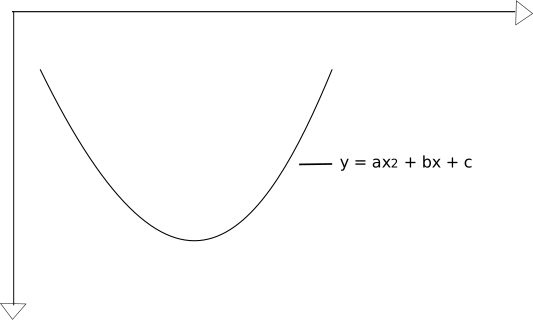
Generating Quadratic Curves for C#
To generate a quadratic curve in C#, you need two points - the starting point and the vertex (turning point - maximum or minimum).
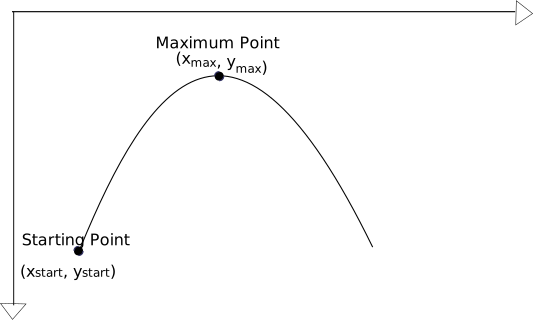
The general quadratic function is:
y = ax2 + bx + c
dy/dx = yI = 2ax + b
At maximum / minimum point, yI = 0
yI|(x = xmax) = 0
2axmax + b = 0
b = -2axmax
Substituting b in the general equation
y = ax2 + bx + c
= ax2 - 2axmaxx + c
At (xstart, ystart):
ystart = axstart2 - 2axmaxxstart + c
At (xmax, ymax):
ymax = axmax2 - 2axmax2 + c
= -axmax2 + c
--------- (eqn *)
Subtracting both derived equations
ystart - ymax =
axstart2 - 2axmaxxstart
+ axmax2
(xstart2 - 2xmaxxstart
+ xmax2)a = ystart - ymax
| a = | ystart - ymax | = | ystart - ymax |
| xstart2 - 2xmaxxstart + xmax2 | (xstart - xmax)2 |
b = -2axmax
& from (eqn *)
c = ymax + axmax2
C# Code Example: Quadratic Path Animation
Once we have the equation, we can generate a quadratic curve with C# to visualize its motion. The following example demonstrates how to animate an object along a quadratic curve in C# using the C# windows form. This is a simple form of quadratic motion simulation that helps visualize parabolic motion, such as a ball being thrown.
To make a body travel by the equation of a quadratic curve, continuously increment x by some interval, and use the quadratic equation to get the corresponding y value.
Create a new C# Windows Forms Application
project
;
call it Dymetric_CS.
Create 2 new C# classes;
Call them Dymetric and QuadraticPath.
Type out the adjoining C# code for animating an image body through
the path of a quadratic curve.
This simple example demonstrates C# quadratic animation.
Key Takeaways on Quadratic Path Animation in C#
- A quadratic function in C# models parabolic motion or curves.
- The quadratic equation C# code can be used for plotting and animations.
- The constants a, b, and c control the shape and direction of the parabola.
Applications in C# Programming and STEM Education
The quadratic equation in C# is useful for programming concepts like projectile motion, trajectory planning, and smooth animation curves. Teachers can use this example to show how maths and coding connect - making parabolas come alive through C# programming.
Teachers and students can use this C# quadratic formula tutorial to explore math and programming together. It's a practical example of using maths with code.
Summary: Visualizing Quadratic Equations in C#
In this tutorial, you've learnt how to solve quadratic equations in C# using the quadratic formula. We've also explore how to plot and animate a quadratic curve on a C# windows form. Understanding how to code the quadratic equation in C# is useful for creating simulations, parabolic motion, and smooth animations.
By combining mathematics and C#, you can solve and animate quadratic equations easily. Whether you're plotting parabolas, simulating motion, or building educational tools, mastering the quadratic formula in C# gives you a solid foundation in computational math.
So! C# Fun Practice Exercise - Animate along Quadratic Path
As a fun practice exercise, try adjusting the coefficients a, b,
and c to change the curve's shape or motion pattern.
This will be a great way to connect mathematics and programming, and help you
understand more about C# animations and quadratic equations.
C# Quadratic Path Window Display Code Stub
C# Quadratic Path Code for Dymetric Class
namespace Dymetric
{
class Dymetric
{
private QuadraticPath quad_curve;
private bool do_simulation;
public Dymetric(int screen_width, int screen_height)
{
quad_curve = new QuadraticPath(screen_width, screen_height);
do_simulation = false;
}
// decide what course of action to take
public void decideAction(PaintEventArgs e, bool click_check)
{
if (do_simulation && click_check)
{
// do animation
quad_curve.inPlay(e);
do_simulation = false;
}
else
{
// Put ball on screen
quad_curve.clearAndDraw(e);
do_simulation = true;
}
}
}
}
C# Animation Code for Quadratic Path class
using System.Threading;
using System.Drawing;
using System.Windows.Forms;
namespace Dymetric
{
class QuadraticPath
{
private int x_start, y_start, x_max, y_max, x, y;
private double a, b, c;
private const int dotDIAMETER = 10;
// we'll be drawing to and from a bitmap image
private Bitmap offscreen_bitmap;
Graphics offscreen_g;
private Brush dot_colour, bg_colour;
public QuadraticPath(int screen_width, int screen_height)
{
dot_colour = new SolidBrush(Color.Yellow);
bg_colour = new SolidBrush(Color.LightGray);
// Create bitmap image
offscreen_bitmap = new Bitmap(screen_width, screen_height - 55,
System.Drawing.Imaging.PixelFormat.Format24bppRgb);
// point graphic object to bitmap image
offscreen_g = Graphics.FromImage(offscreen_bitmap);
// Set background of bitmap graphic
offscreen_g.Clear(Color.LightGray);
x_start = x = 10;
y_start = y = offscreen_bitmap.Height - 70;
x_max = offscreen_bitmap.Width / 2 - 50;
y_max = 20;
// constants
a = (y_start - y_max) / Math.Pow((x_start - x_max), 2);
b = -2 * a * x_max;
c = y_max + a*Math.Pow(x_max, 2);
}
// draw first appearance of dot on the screen
public void clearAndDraw(PaintEventArgs e)
{
/*
* draw to offscreen bitmap
*/
// clear entire bitmap
offscreen_g.Clear(Color.LightGray);
// draw dot
offscreen_g.FillEllipse(dot_colour, x, y, dotDIAMETER, dotDIAMETER);
// draw to screen
Graphics gr = e.Graphics;
gr.DrawImage(offscreen_bitmap, 0, 55, offscreen_bitmap.Width, offscreen_bitmap.Height);
}
// repetitively clear and draw dot on the screen - Simulate motion
public void inPlay(PaintEventArgs e)
{
Graphics gr = e.Graphics;
// condition for continuing motion
while (x < offscreen_bitmap.Width - dotDIAMETER)
{
// redraw dot
offscreen_g.FillEllipse(dot_colour, x, y, dotDIAMETER, dotDIAMETER);
// draw to screen
gr.DrawImage(offscreen_bitmap, 0, 55, offscreen_bitmap.Width, offscreen_bitmap.Height);
x += 20;
y = (int)Math.Round(a * x * x + b * x + c);
// take a time pause
Thread.Sleep(50);
}
x = x_start;
y = y_start;
}
}
}