
Understanding the Ellipse Equation | Maths Explanation for C# Kids
In geometry, an ellipse can be defined as the set of all points where the sum of the distances to two foci is constant. The general form of an ellipse equation is (x - h)² / a² + (y - k)² / b² = 1. We'll use this to calculate ellipse points dynamically in C#. In this tutorial, we'll explore the ellipse equation in C#, derive its conic form, and show how to draw and animate ellipses on an C# windows form using simple C# code.
Using the Equation of an Ellipse in C#
Ellipses are represented by the general equation
| (x - h)2 | + | (y - k)2 | = 1 |
| a2 | b2 |
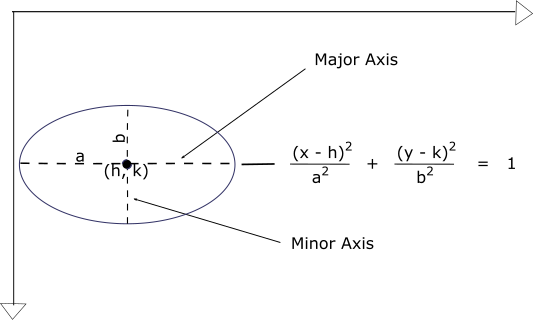
To animate motion along the ellipse in C#, we'll express *y* in terms of *x*.
Solving for y, we have:
| (y - k)2 | = 1 - | (x - h)2 |
| b2 | a2 | |
| (y - k)2 | = | a2 - (x - h)2 |
| b2 | a2 |
| (y - k)2 = b2[ | a2 - (x - h)2 | ] |
| a2 | ||
| (y - k) = | ±b√(a2 - (x - h)2) | |
| a |
y = k ± b/a√(a2 - (x - h)2)
This gives us two values for *y* (the upper and lower halves of the ellipse). We can use these values to plot and animate a moving object in C# on both curves.
Parametric Equations of a Ellipse | Maths Explanation for C# Kids
Elliptical motion can also be represented parametrically:
y = k + b * sin(θ)
These equations allow you to move an object smoothly along an elliptical trajectory on the canvas in C#, especially for animations, games, and physics simulations.
Animating Elliptical Motion with C#
To move a small image body (or dot) along an elliptical trajectory, we'll increment *x* from *(h - a)* to *(h + a)* and compute *y* using the ellipse equation in C#.
Create a new C# Windows Forms Application
project
;
call it Dymetric_CS.
Create 2 new C# classes;
Call them Dymetric and EllipticalPath.
Type out the adjoining C# code for animating an image body through the path of an ellipse.
How the C# Ellipse Equation Animation Code Works
When you click the Move button, a dot will trace the upper and lower halves of the ellipse, showing how the ellipse equation in C# generates smooth, curved motion.
Key Takeaways on Elliptical Path Animation in C#
In this tutorial, you've learned that:
- The general form of the ellipse equation is (x - h)² / a² + (y - k)² / b² = 1
- With an ellipse equation, you can draw and animate an ellipse in C#
- Applications of elliptical path animation include use in graphics, game design, and physics simulations
Applications of Ellipse Equations
Elliptical motion is used in physics simulations, orbital paths, and data visualization. By understanding the ellipse equation in C#, you can create animations, model celestial orbits, or generate smooth transitions in web graphics.
FAQs: Ellipse Equation and C#
What is the equation of an ellipse in C#?
The equation (x - h)² / a² + (y - k)² / b² = 1 can be implemented using C# to compute ellipse points or draw an ellipse on a canvas element.
How else do you animate an ellipse path on canvas?
Use the parametric form x = h + a * cos(t), y = k + b * sin(t), and increment θ over time using
requestAnimationFrame() to create smooth elliptical motion.
Can you draw ellipses using the Canvas API directly?
Yes. The ctx.ellipse() method in modern browsers allows you to draw an ellipse directly without manually computing each point.
Summary: Visualizing ellipse Equation in C#
Ellipses are fundamental conic sections, and in C#, you can use their equations to draw and animate motion along an elliptical path on an C# windows form.
In this lesson, we've derived the ellipse equation, express it in code, and use C# to animate an image body moving through an ellipse.
So! C# Fun Practice Exercise - Animate along Elliptical Path
As a fun practice exercise, try adjusting the foci points - a, b;
and the major and minor radii - h, k; to change the ellipse's position and size.
This will be a great way to connect mathematics and programming, and help you
understand more about C# animations and ellipse equations.
C# Elliptical Path Window Display Code Stub
C# Elliptical Path Code for Dymetric Class
namespace Dymetric
{
class Dymetric
{
private EllipticalPath ellipse_ride;
private bool do_simulation;
public Dymetric(int screen_width, int screen_height)
{
ellipse_ride = new EllipticalPath(screen_width, screen_height);
do_simulation = false;
}
// decide what course of action to take
public void decideAction(PaintEventArgs e, bool click_check)
{
if (do_simulation && click_check)
{
// do animation
ellipse_ride.inPlay(e);
do_simulation = false;
}
else
{
// Put ball on screen
ellipse_ride.clearAndDraw(e);
do_simulation = true;
}
}
}
}
C# Animation Code for Elliptical Path Class
using System.Threading;
using System.Drawing;
using System.Windows.Forms;
namespace Dymetric
{
class EllipticalPath
{
private int h, k, a, b, x, y;
private const int dotDIAMETER = 10;
// we'll be drawing to and from a bitmap image
private Bitmap offscreen_bitmap;
Graphics offscreen_g;
private Brush dot_colour, bg_colour;
public EllipticalPath(int screen_width, int screen_height)
{
dot_colour = new SolidBrush(Color.Yellow);
bg_colour = new SolidBrush(Color.LightGray);
// Create bitmap image
offscreen_bitmap = new Bitmap(screen_width, screen_height - 55,
System.Drawing.Imaging.PixelFormat.Format24bppRgb);
// point graphic object to bitmap image
offscreen_g = Graphics.FromImage(offscreen_bitmap);
// Set background of bitmap graphic
offscreen_g.Clear(Color.LightGray);
// ellipse centre coordinates
h = offscreen_bitmap.Width / 2;
k = offscreen_bitmap.Height / 2;
// ellipse major and minor semi-axes
a = offscreen_bitmap.Width / 3;
b = offscreen_bitmap.Height / 3;
x = h - a;
y = k;
}
// draw first appearance of dot on the screen
public void clearAndDraw(PaintEventArgs e)
{
/*
* draw to offscreen bitmap
*/
// clear entire bitmap
offscreen_g.Clear(Color.LightGray);
// draw dot
offscreen_g.FillEllipse(dot_colour, x, y, dotDIAMETER, dotDIAMETER);
// draw to screen
Graphics gr = e.Graphics;
gr.DrawImage(offscreen_bitmap, 0, 55, offscreen_bitmap.Width, offscreen_bitmap.Height);
}
// repetitively clear and draw dot on the screen - Simulate motion
public void inPlay(PaintEventArgs e)
{
Graphics gr = e.Graphics;
// condition for continuing motion
while (x <= h + a)
{
y = (int)Math.Round(k - ((double)b / a) * Math.Sqrt(Math.Pow(a, 2) - Math.Pow((x - h), 2)));
// redraw dot
offscreen_g.FillEllipse(dot_colour, x, y, dotDIAMETER, dotDIAMETER);
y = (int)Math.Round(k + ((double)b / a) * Math.Sqrt(Math.Pow(a, 2) - Math.Pow((x - h), 2)));
// redraw dot
offscreen_g.FillEllipse(dot_colour, x, y, dotDIAMETER, dotDIAMETER);
// draw to screen
gr.DrawImage(offscreen_bitmap, 0, 55, offscreen_bitmap.Width, offscreen_bitmap.Height);
x += 20;
// take a time pause
Thread.Sleep(50);
}
x = h - a;
y = k;
}
}
}