
Understanding Prime Numbers in Python
Prime numbers are a fundamental concept in mathematics and computer science. In this tutorial, you'll learn how to check if a number is prime in Python using a simple yet efficient algorithm. This guide is designed for beginners, students, and teachers who want to combine math programming tutorials with practical coding exercises.
What is a Prime Number? | Maths Explanation for Python Kids
A prime number is a natural number greater than 1 that has no divisors other than 1 and itself. For example, 2, 3, 5, and 7 are prime numbers. Understanding prime numbers is essential for Python math projects and coding challenges.
The Intrique of Prime Numbers | Explanation for Python Kids
Prime numbers are tricky to spot.
A number that looks like a prime may in fact be a multiple of a smaller prime number.
Python Prime Number Logic Explained
To perform a prime number test in Python, we check whether a given number is divisible by any integer other than 1 and itself.
The basic idea of the Python prime number algorithm is:
- If the number is less than or equal to 1, it is not prime.
- Try dividing the number by integers starting from 2.
- If the number divides exactly by any value, it is not prime.
- If no divisors are found, the number is prime.
This logic is commonly used in Python number algorithms for beginners.
Create a new Python Module File;
Call it CheckPrime.py
Type out the adjoining Python code for checking for primeness.
Efficient Python Prime Number Test Using Square Root Method
Since the world is always in a hurry, we can make use of a
little extra speed.
This Python code example shows how to check if a number is prime using a fast algorithm based on complementary factors.
A more efficient way to check for primeness in Python is to test divisibility only up to the square root of the number. This reduces the number of calculations and improves performance.
By limiting checks to the square root of the number, this fast prime number check in Python ensures efficiency even for larger numbers. This method is widely used in programming competitions and educational exercises.
Base Theory of Quick-Check for Primeness in Python
Consider the number 36; Its factors are:
Every factor of 36, when arranged in ascending or descending order, can be divided into 2 equal parts at the position of its square-root.
It is easily seen that every factor of 36 on one side of the divide has a complementary factor on the other side.
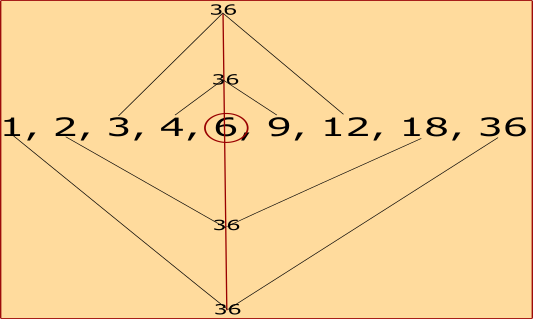
Hence, we can search for only a particular group of factors, (preferably the more compact group, i.e, between 1 and \(\sqrt{36}\)) to see if 36 has any factors.
Fast Check for Primeness in Python
So for our quick prime number check Python algorithm, we will use the range of
2 to \(\sqrt{number}\).
Type out the adjoining Python code for fast prime number check.
Prime vs Composite Numbers in Python
- Prime numbers have exactly two factors.
- Composite numbers have more than two factors.
- The number 1 is neither prime nor composite.
Understanding the difference between prime and composite numbers is important when working with Python math programs and number-based logic.
Why Learn Prime Numbers with Python?
Combining mathematics with programming makes learning more engaging. Teachers can use this as a math programming tutorial for kids, while learners can practice Python coding exercises that strengthen both logical thinking and problem-solving skills.
Key Takeaways from Python Check Prime Number Algorithm
- Prime numbers are divisible only by 1 and themselves
- Python can easily test prime numbers using loops
- Optimized prime checking improves efficiency
- This logic is ideal for beginners and students
Summary: How to Check If a Number Is Prime in Python
To check if a number is prime in Python:
- Ensure the number is greater than 1
- Test divisibility using a loop
- Use an optimized approach for better performance
These methods form the foundation of many Python prime number tutorials and help learners understand loops, conditions, and algorithms.
So! Python Fun Practice Exercise - Check Prime Number
As a fun practice exercise, feel free to try out your own numbers, and see how the Python code checks the numbers to ascertain which ones are prime numbers.
Python Code for Checking Prime - Module File.
class TestPrimeness:
def __init__(self, suspect):
self.prime_suspect = suspect
# returns true if $prime_suspect is a prime false otherwise.
def verifyPrime(self):
# prime_suspect is a prime number until proven otherwise
# Loop through searching for factors.
for self.count in range(2, self.prime_suspect):
if self.prime_suspect % self.count == 0:
self.a_factor = self.count
return False
# If no factor is found:
return True
Python Code for Checking Prime - Main Class.
from CheckPrime import TestPrimeness
# Use the check prime module/class
test_guy = 97
prime_check = TestPrimeness(test_guy)
result = "Prime State:\n"
if prime_check.verifyPrime():
result = "test_guy is a prime number."
else:
result += "test_guy is not a prime number.\n"
result += "At least one factor of test_guy is " + str(prime_check.a_factor)
print(result)
print("\n\n")
Python Code for Fast Check for Primeness - Module File
from math import ceil, sqrt
# A class
class TestPrimenessFast:
# Constructor
def __init__(self, suspect):
self.prime_suspect = suspect
# returns true if prime_suspect is a prime false otherwise.
def verifyPrimeFast(self):
# prime_suspect is a prime number until proven otherwise
# Loop through searching for factors.
self.test_range = ceil(sqrt(self.prime_suspect))
for self.count in range(2, self.test_range):
if self.prime_suspect % self.count == 0:
self.a_factor = self.count
return False
# If no factor is found:
return True
Python Code for Fast Check for Primeness - Main Class.
from CheckPrimeFast import TestPrimenessFast
# Use the check prime module/class
test_guy = 49
prime_check = TestPrimenessFast(test_guy)
result = "Prime State:\n"
if prime_check.verifyPrimeFast():
result = "test_guy is a prime number."
else:
result += "test_guy is not a prime number.\n"
result += "At least one factor of test_guy is " + str(prime_check.a_factor)
print(result)
print("\n\n")