
What is LCM? | Maths Explanation for VB.Net Kids
Akin to finding H.C.F., L.C.M. is commonly found by repeated factorization.
Only this time, the factors do not have to be common amongst the set of numbers.
If we have the set of numbers 8, 12 and
18 for example, their L.C.M. is found thus:
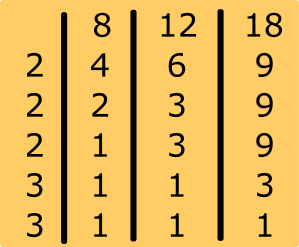
Hence, L.C.M. of 8, 12 and 18 = 2 X 2 X 2 x 3 x 3 = 72
Step-by-Step Guide to L.C.M. by Factorisation in VB.Net
We shall follow the steps below in writing our Visual Basic LCM code.
Step 1:
Do a numerical reverse sort on the (resulting) set so its first member is the largest in the set.
Step 2:
Starting with 2, iteratively check through the set of numbers for individual factors.
Step 3:
For each individual factor, divide affected member(s) of the number set by the factor.
Step 4:
Repeat the above steps recursively until there are no more individual factors.
Create a new VB.Net class file; Project, Add Class.
Call it findLCM.vb.
Optionally, Create a new VB.Net module file; Project, Add Module.
Call it FindLCMModule.vb.
Type out the adjoining Visual Basic (VB.Net) code for finding Lowest Common Multiple (L.C.M.)
Note: You can just reuse the VB.Net main module from the previous lesson if you have been following.
So! Visual Basic Fun Practice Exercise - Find LCM
As a fun practice exercise, feel free to try out your own numbers, and see how the Visual Basic code finds the LCM of those numbers.
VB.Net Code for Find LCM - Class File.
Dim set_of_numbers As New List(Of Integer) ' will hold the the values to be sent in
Dim all_factors As New List(Of Integer) ' for housing all common factors
Dim state_check As Boolean
Dim calc_result As Integer
Dim index As Integer
' A constructor
Public Sub _init_(group As List(Of Integer))
For Each member In group
set_of_numbers.Add(member)
Next
' Sort array in descending order
set_of_numbers.Sort()
set_of_numbers.Reverse()
index = 1
state_check = False
calc_result = 1
End Sub
Private Function findLCMFactors() As List(Of Integer)
' Copy 'set_of_numbers' into 'arg_copy'
Dim arg_copy As New List(Of Integer)
For Each number In set_of_numbers
arg_copy.Add(number)
Next
' STEP 1:
' sort in descending order
arg_copy.Sort()
arg_copy.Reverse()
Do While index <= arg_copy.Item(0)
state_check = False
For count_off = 0 To set_of_numbers.Count - 1
If set_of_numbers.Item(count_off) Mod index = 0 Then
' STEP 3:
set_of_numbers.Item(count_off) = CInt(set_of_numbers.Item(count_off) / index)
If state_check = False Then
all_factors.Add(index)
End If
state_check = True ' do Not store the factor twice
End If
Next count_off
' STEP 4:
If state_check Then
Return findLCMFactors()
End If
index += 1
Loop
Return Nothing
End Function
' Returns an array reference Of the desired Set Of even numbers
Public Function getLCM() As Integer
' STEP 2:
index = 2
findLCMFactors()
' iterate through And retrieve members
For Each factor In all_factors
calc_result *= factor
Next factor
Return calc_result
End Function
End Class
VB.Net Code for Find LCM - Main Module.
Sub Main()
' Use the LCM Class
Dim group As New List(Of Integer)({20, 30, 40})
Dim lcm As New LCM
lcm._init_(group)
Dim answer = lcm.getLCM()
Console.Write("The L.C.M. of " & String.Join(", ", group) & " is " & answer)
End Sub
End Module